

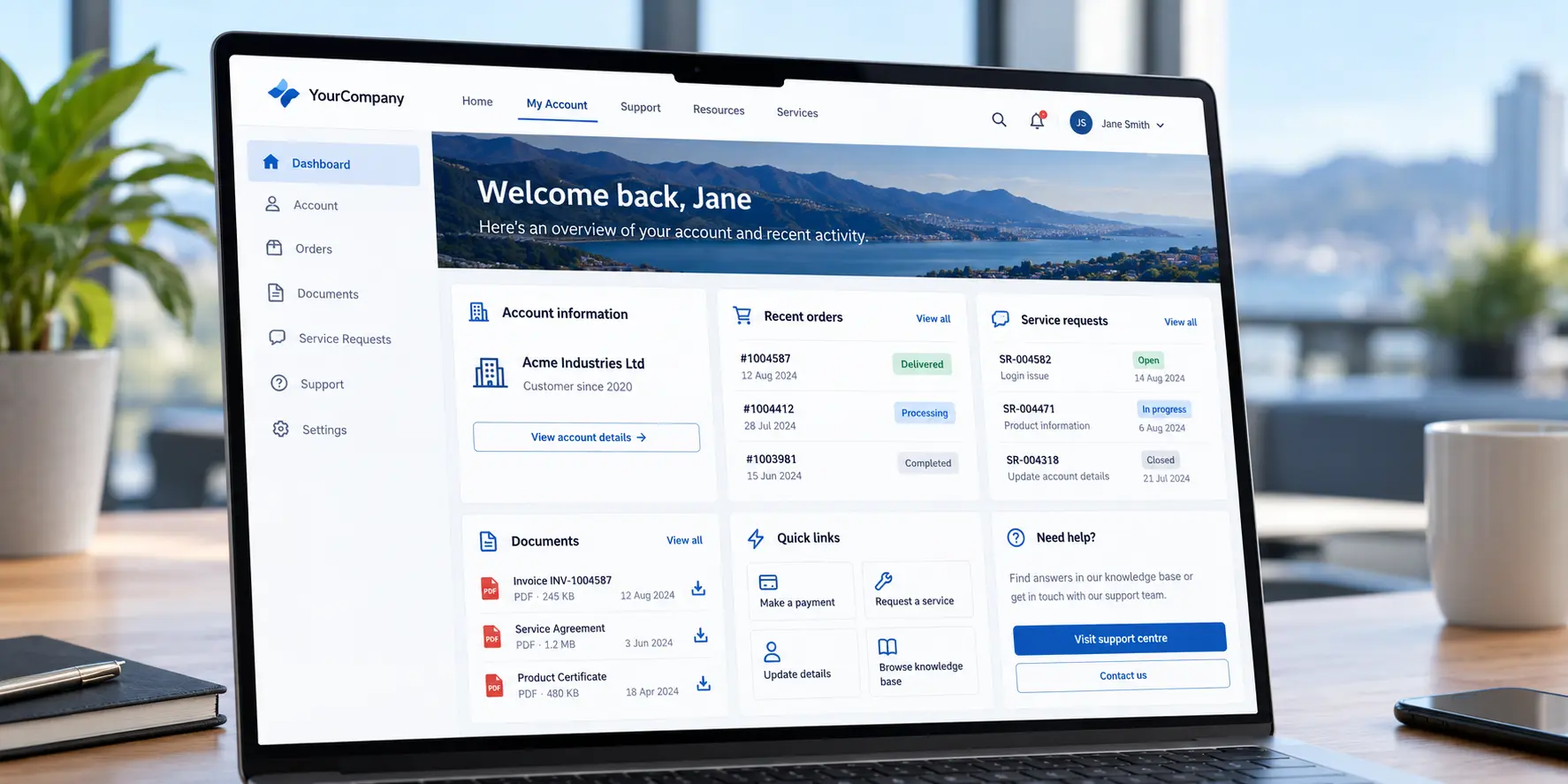
Customers expect to manage routine tasks online: checking account information, finding answers, downloading documents, tracking orders and submitting service requests. When these tasks require a phone call or email, customers may have to wait, and service teams spend time handling enquiries that could be completed digitally.
An enterprise customer portal is a secure online destination where customers can access information and services related to their relationship with an organisation. It can bring together customer-specific content, account information and tasks that may otherwise sit across multiple systems.
Liferay Digital Experience Platform (DXP) can provide a foundation for building customer portals, with capabilities for content, user access, personalisation and integration. The right solution depends on what customers need to do and how those services connect with the organisation’s existing systems. For a broader introduction, read our guide to what Liferay DXP is.
What can an enterprise customer portal provide?
The features depend on the organisation, its customers and the systems already in place. Common capabilities include:
The goal is not to add as many features as possible. It is to make the tasks customers perform most often simpler and easier to complete.
Why do organisations invest in customer portals?
An effective portal can improve access to services for customers and help internal teams focus on work that needs their attention. The benefits depend on whether the portal addresses real service needs.
More convenient service
Customers can access supported digital services when it suits them, including outside standard business hours. For organisations serving customers across New Zealand and Australia, an online service can also accommodate different locations and working hours.
Fewer repetitive enquiries
Customer service teams often receive questions about account details, invoices, order status and commonly requested information. Making suitable information and tasks available through self-service may reduce routine enquiries. It does not remove the need for human assistance; customers should still have a clear way to get help when they need it.
More consistent information
When information is spread across emails, documents and separate business applications, customers may need to navigate several channels to complete a task. A portal can provide a single access point to approved information and services.
Better insight into service needs
With appropriate analytics and measurement, organisations can see which services customers use, where tasks are abandoned and what information is difficult to find. Those findings can guide improvements to the portal and its underlying processes.
How can Liferay support an enterprise customer portal?
Liferay DXP is designed to support websites, portals and connected digital experiences. Its capabilities can help organisations build and manage customer-facing experiences, while the configuration and integrations needed depend on each project.
Access, roles and permissions
Enterprise portals may serve several types of users. A business customer might view invoices, an account administrator might manage other users, and internal staff may need additional support permissions.
Liferay provides a roles and permissions framework to control access to applications, resources and content. Its user, account and organisation structures can help represent business relationships and associated access requirements. See Liferay’s roles and permissions documentation for details.
These capabilities need to be configured for the organisation’s requirements. When a portal displays information from connected systems, those integrations must also enforce the appropriate authorisation rules.
Personalised experiences
Different customers may need different content and services. For example, trade customers may need account-specific resources while service customers need technical support information.
Liferay supports personalising content-page experiences for defined user segments. Personalisation should serve a clear purpose and remain manageable for the teams maintaining the site.
Segmentation arrangements depend on the DXP release and installation. Liferay’s guidance for DXP 2026.Q1 says existing customers can continue to manage segments in DXP for at least a year, while new installations use segments synced from Analytics Cloud by default. Confirm the applicable setup during solution planning.
Content management
A portal depends on accurate, accessible and current information. Liferay’s content management capabilities can support knowledge articles, service information, instructions and reusable content.
Organisations should assign editorial responsibility and set review processes so information stays relevant. This matters when content is maintained by multiple departments, locations or business units.
Integration with existing systems
Customer information may be held in a CRM, while product availability, invoices and orders may be managed in an ERP or commerce system. A portal should complement these systems rather than create unnecessary duplicate records.
Liferay provides APIs and extension approaches, including client extensions, that developers can use to connect portal experiences with other applications and services. For example, a portal could display order information retrieved from an ERP. The integration, data mapping, authentication, business logic and error handling need to be designed and implemented for the specific systems involved.
What should organisations plan before building a portal?
Choosing a platform is only one part of a portal project. Requirements, integrations and delivery decisions affect how useful, secure and maintainable the finished service will be.
Start with customer needs
Identify who will use the portal and what they need to accomplish. Ask which enquiries occur most often, which tasks customers should complete independently, what information requires authentication, which activities need staff involvement, and what device and accessibility needs must be supported.
Plan integrations and data migration
For each integration, establish which system owns the data, how frequently information should update, and what happens if a connected service is unavailable. Decide whether the portal should retrieve information from a source system or store a copy.
If data needs to move from an existing portal or other system, assess its quality, structure, history, ownership and retention requirements. Plan how records will be mapped, validated and tested before migration, and agree how users will be supported during the change.
Design security and permissions
Customer portals may handle commercially sensitive or personal information. Project planning should cover authentication, role-based access, data protection, session management, audit requirements and secure integrations.
Organisations operating in New Zealand and Australia should review applicable privacy obligations, data-hosting arrangements and internal security policies. A platform’s security capabilities do not by themselves guarantee that an implementation is secure.
Consider accessibility, performance and mobile use
Navigation, forms, content and interactive services should work for the people using them. Define accessibility requirements and test against suitable standards, such as WCAG 2.2. Performance testing should reflect expected usage, connected-system response times and common customer devices.
Establish content governance
Define who can create, review, approve, update and retire portal content. Without clear ownership, information can become outdated even when the underlying technology is capable.
Deliver in manageable phases
Not every feature needs to be available at launch. An organisation might begin with secure login, account information and frequently requested documents before introducing more complex transactions. Phased delivery gives teams opportunities to validate customer needs, test integrations and improve the experience before expanding it.
How should portal success be measured?
A successful launch is more than a functioning website. Measures should reflect the tasks the portal is intended to support. Depending on the project, useful measures may include:
For example, a self-service completion rate can be calculated by dividing successfully completed task attempts by all task attempts started, then multiplying by 100. Measurement requires appropriate event tracking, reporting tools and agreed definitions. Include these in the implementation requirements rather than assuming they are automatic Liferay measurements.
Comparing results with a baseline established before launch can help determine whether the portal is delivering its intended benefits.
When might a customer portal be unnecessary?
Not every organisation needs a comprehensive enterprise portal. If customers only need a small set of public documents or a straightforward contact form, a conventional website may be enough. If an existing CRM or service platform already provides a suitable customer-facing interface, extending that solution may be more practical than introducing another platform.
A portal is more relevant when an organisation needs a connected experience involving multiple systems, customer groups, permissions and digital services. The decision should reflect business requirements, implementation complexity and long-term ownership.
A customer portal example: Sky TV New Zealand
New Zealand broadcaster Sky TV is an example of a customer self-service experience built using Liferay technology. In its published case study, Liferay says Sky TV enabled customers to manage accounts and make purchases online. Liferay reports 140% more customer transactions being digitally self-serviced and a decrease in calls to Sky TV’s contact centre.
This is an example of a Liferay implementation, not a project delivered by The Web Company. It illustrates how a connected account experience can support digital service delivery when customer journeys and underlying integrations are designed for the organisation’s needs.
Planning a Liferay customer portal with The Web Company
At The Web Company, we start by understanding the organisation’s objectives, customer journeys and existing systems. That helps establish which requirements may be met through platform capabilities and which may need configuration, integration or custom development.
Planning typically includes defining user journeys, identifying integration and data migration needs, establishing permissions, assigning content ownership, and agreeing how success will be measured. For businesses evaluating Liferay, these decisions help shape a practical scope and delivery plan.
Building self-service around your customers
A well-designed customer portal can give customers easier access to information, support digital service processes and create a more connected experience. Liferay provides capabilities for content, permissions, personalisation and integration, but the value depends on how well they are applied to an organisation’s actual requirements.
If you are considering a customer self-service portal or looking to connect existing CRM, ERP and business applications, talk to The Web Company about your requirements, integration challenges and implementation options. We can help you explore where Liferay may fit and what to define before development begins.
Explore The Web Company’s Liferay services