
Headless CMS vs DXP: Which Approach Does Your Organisation Need
A practical guide to choosing the right digital architecture for enterprise websites, customer portals and connected digital experiences.
As organisations invest in modernising their digital platforms, one question frequently arises: Should we implement a Headless Content Management System (CMS), or do we need a broader Digital Experience Platform (DXP)?
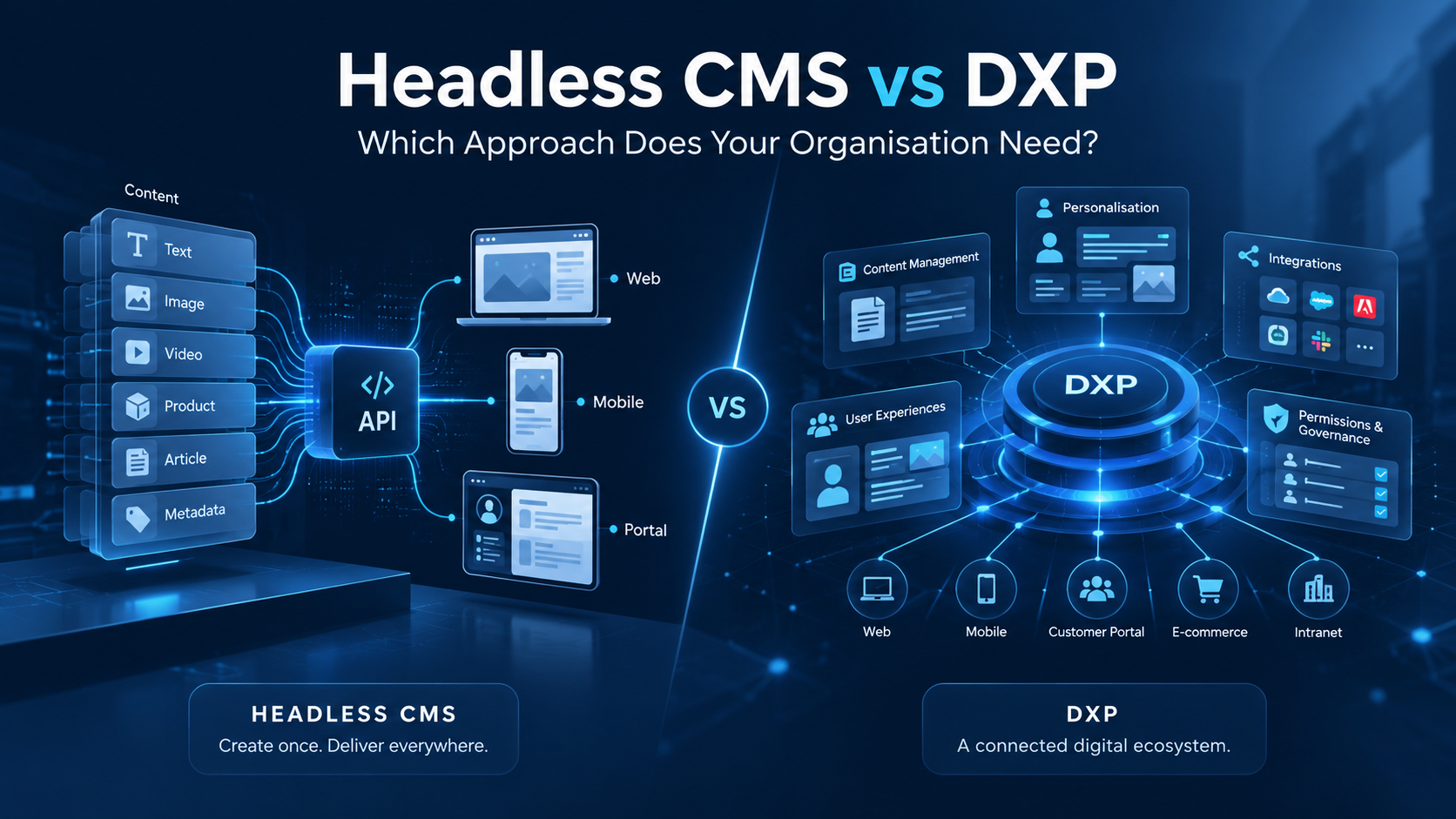
Both approaches can support modern digital experiences, but they solve different problems. A Headless CMS focuses on managing and delivering content independently of how that content is presented. A DXP takes a broader approach, bringing together content, integrations, personalisation, user management and other capabilities required to deliver connected digital experiences.
The decision is not simply about selecting the newest technology. It is about understanding your organisation’s requirements, the complexity of your digital environment and how your technology needs may evolve. For organisations across New Zealand and Australia, making the right architectural choice can help avoid unnecessary development costs, reduce long-term integration challenges and create a platform that supports future growth.
What is a Headless CMS?
A Headless Content Management System allows organisations to create, manage and store digital content without tying it to a specific website or presentation layer. Traditional content management systems typically combine content management with tools for displaying that content. A Headless CMS separates these responsibilities.
Content is managed centrally and delivered through Application Programming Interfaces (APIs), allowing developers to build the front-end experience using their preferred technologies. An organisation could manage product information, articles or service descriptions in one Headless CMS and distribute that content to a corporate website, mobile application, customer portal and other digital channels.
Benefits of a Headless CMS
- Front-end flexibility: developers can choose frameworks and technologies without being restricted to the CMS presentation tools.
- Content reuse: a single content repository can supply multiple websites, applications and channels.
- Independent development: teams can update front-end applications separately from the content platform, subject to API compatibility.
- Scalability: content services and presentation applications can be scaled independently where the architecture supports it.
- Channel flexibility: new digital interfaces can be introduced without rebuilding the content repository.
However, headless architecture also introduces considerations. Because the front end is managed separately, organisations may need additional development for page-building tools, content previews, search, personalisation and other functions that traditional CMS platforms often include. Architectural flexibility does not automatically translate into simpler implementation.
What is a Digital Experience Platform (DXP)?
A Digital Experience Platform is a broader technology platform designed to help organisations build, manage and deliver digital experiences across multiple channels and audiences. While a CMS primarily manages content, a DXP supports wider operational and technical capabilities. Depending on the platform, these may include content management, identity and access management, personalisation, workflow automation, analytics and integrations with enterprise applications.
Consider a manufacturer providing different experiences for customers, distributors, employees and partners. Its platform may need to connect with an Enterprise Resource Planning (ERP) system, Customer Relationship Management (CRM) platform, inventory database and internal business applications. Different users may require different products, documents, pricing or account information. In this environment, the challenge is not just delivering content: it is securely connecting systems, managing permissions and delivering the right information and functionality to each audience.
Headless CMS vs DXP: What is the difference?
| Capability | Headless CMS | Digital Experience Platform |
|---|---|---|
| Primary purpose | Manage and distribute content | Build and manage connected digital experiences |
| Content delivery | API-based | Traditional, headless or hybrid, depending on platform |
| Front-end development | Usually separately developed | May include built-in presentation tools and APIs |
| Personalisation | Often requires additional services | Frequently platform capabilities or integrations |
| User permissions | Mainly content and administrative permissions | Can include sophisticated roles and experience permissions |
| Enterprise integrations | Typically API-based and custom | Often broader integration capabilities |
| Workflow management | Usually content focused | May extend into business processes |
| Best suited to | Content-led, multichannel applications | Complex portals and enterprise experiences |
When is a Headless CMS sufficient?
A Headless CMS may be most appropriate when the main requirement is to create, manage and distribute content efficiently. For example, a business operating a corporate website and mobile application may need a central repository for news, product information and marketing content, without complex account management or business-system integrations.
- Content distribution is the primary challenge.
- Several digital channels need access to the same information.
- Existing systems already provide authentication, analytics and other required capabilities.
- Development teams can build and maintain separate front-end applications.
- The organisation values flexibility to select technologies for different functions.
Assess total cost of ownership rather than comparing CMS licence fees alone. Development, hosting, API maintenance, front-end frameworks, security, integrations and ongoing support all contribute to the real cost.
When does an organisation need a broader DXP?
A DXP becomes more relevant when digital experiences depend on multiple interconnected business capabilities. This is common where websites and portals are operational tools rather than simple information channels.
- Customer self-service portals: secure access to accounts, orders, invoices, support requests and personalised services.
- Partner and distributor platforms: different product information, documentation, pricing and workflows based on relationships and permissions.
- Employee portals and intranets: central access to internal applications, documents, company information and processes.
- Complex enterprise ecosystems: multiple departments, systems and audiences using shared identity, governance and integration.
The value lies not merely in feature count, but in how capabilities work together. Reusing platform-provided authentication, permissions, content delivery and page management can reduce duplicated development, provided those capabilities are actually needed and implemented effectively.
Why integrations, personalisation and permissions matter
Enterprise integrations
Established organisations typically operate ERP, CRM, finance, inventory, document and specialist operational systems. A digital platform may need to retrieve and display data from these securely. A Headless CMS can participate through APIs but may not supply all the integration orchestration, identity coordination or application functionality required. A DXP may provide a more integrated foundation, although middleware, custom connectors and development can still be needed.
Personalisation
Personalisation delivers different content or functionality based on relevant user information. A distributor might see documentation for represented brands; a customer might see resources specific to their account. A Headless CMS can supply personalised content, while the selection logic may reside in a separate application or service. Many DXPs support central audience segmentation and experience variations. Personalisation must also be distinguished from authorisation: relevance is not the same as permission to access.
User permissions and security
An employee, customer, distributor and contractor may access the same platform but need different information and functionality. Managing these permissions consistently across applications takes careful planning. A DXP with identity, role and permissions capabilities may reduce custom infrastructure, but does not replace secure integration design or authorisation checks in connected systems.
Can Liferay operate as a Headless CMS?
Yes. Liferay supports headless content management and API-based delivery, allowing organisations to manage content within Liferay while presenting it through independently developed applications. Structured content and digital assets can be centrally managed and consumed through supported REST APIs and GraphQL capabilities. Liferay REST APIs follow the OpenAPI standard, while GraphQL is available through the /o/graphql endpoint. The available APIs and operations depend on the Liferay release and installed applications; developers should confirm them in the instance API Explorer at /o/api.
GraphQL versioning also varies by release. Versioned, namespaced GraphQL APIs are supported from Liferay DXP 2024.Q2 / Portal GA120+, and non-versioned API names are deprecated in that context. OAuth2 should be used for production authentication rather than development-only Basic Auth. Refer to Liferay’s official headless API documentation when confirming implementation details.
For example, a business could manage knowledge articles or product-support information in Liferay and make them available to an external customer application. The content stays centrally managed while presentation is independently developed.
Can Liferay support conventional and headless delivery?
Yes. Liferay DXP supports conventional page-based experiences alongside headless delivery, enabling a hybrid approach. An organisation might use Liferay’s page-building and content-management tools for its corporate website, APIs for a mobile application, and a mixture of platform-managed pages and custom components in a customer portal.
This flexibility can support progressive modernisation rather than replacing every application at once. It also lets content teams retain visual editing tools where useful, while developers use APIs for more specialised interfaces. Implementation patterns and available features depend on the Liferay version and configuration.
When can headless architecture introduce unnecessary complexity?
Headless is not automatically the best choice for every project. For a straightforward website, developers may need to recreate page routing, previews, navigation, search, SEO metadata handling and visual editing that an integrated CMS already provides. Multiple services, environments, API versions and deployments add ongoing responsibilities.
A headless implementation can also make content teams more dependent on developers if publishing and preview tools are not designed for their needs. These challenges are manageable but must be justified by business value. The key question is whether separation of content management and presentation is worth the additional architectural responsibilities.
How to choose the right architecture for your organisation
A practical discovery process should answer the following questions:
- Is content publishing and reuse the primary need, or must the platform deliver connected digital services?
- Do customers, partners or employees need secure access to different information and functionality?
- How much ERP, CRM or other enterprise integration will be required?
- Do content teams require independent visual page building and preview?
- Do channels genuinely require independently developed front ends?
- Can the team support multiple APIs, deployments and security boundaries?
Discovery should also examine user journeys, existing applications, information security, governance, operating capacity, licensing, hosting and future roadmap. Lower initial project cost does not always mean lower long-term cost.
Headless CMS, DXP or a hybrid approach: Which is right?
A dedicated Headless CMS is often suitable for reusable content delivery when surrounding systems supply other required capabilities. A DXP may suit complex permissions, integrations, connected journeys and reusable application features. A hybrid architecture combines page management with headless delivery where independent applications require it.
A composable architecture built from a Headless CMS and specialised identity, search, personalisation and integration services is another option. It may increase vendor flexibility but puts responsibility for interoperability and security on the organisation. There is no universally correct answer: choose the architecture that meets current requirements without creating unmanageable complexity.
Where Liferay fits into the decision
Liferay is worth evaluating where an organisation needs more than basic content publishing without sacrificing modern API-based development. Its traditional page delivery, structured content management, headless APIs and enterprise experience capabilities make it relevant to CMS modernisation and broader digital transformation.
For customer portals, supplier platforms, intranets and connected enterprise applications, Liferay DXP can provide a foundation for bringing capabilities together. However, adopting a full DXP should be justified by its actual value. If content delivery to a few channels is the sole requirement, a dedicated Headless CMS may be more proportionate.
Final thoughts: Choose the architecture that solves the business problem
The Headless CMS vs DXP decision should begin with business and operational requirements, not a preference for a technology trend. Headless CMS solutions can provide excellent content flexibility. DXPs can help address wider challenges involving integrations, permissions and connected customer experiences. Many organisations will benefit from a well-designed hybrid approach.
The goal is to select an architecture that provides the functionality your organisation needs without introducing unnecessary complexity, cost or technical dependencies.
Discuss your digital architecture with The Web Company
Selecting an enterprise CMS or DXP is an important investment decision. At The Web Company, we help organisations evaluate requirements, understand existing technology environments and plan Liferay solutions aligned with business objectives. Whether you are considering Headless CMS, exploring Liferay DXP or modernising an enterprise website or portal, our team can help you assess the options and identify a practical way forward.
Explore our Liferay development, integration and support services or learn more about enterprise customer portals.
Frequently asked questions
-
Is a Headless CMS the same as a DXP?
No. A Headless CMS manages and distributes content through APIs; a DXP provides broader capabilities for connected digital experiences and may itself include headless CMS features.
-
Is a DXP better than a traditional CMS?
Not necessarily. A DXP is valuable for complex integrations, users and experiences. A traditional CMS may be better for a straightforward website.
-
Can Liferay be used as a Headless CMS?
Yes. Liferay supports structured content management and APIs for external websites and applications.
-
Does Liferay support both headless and traditional websites?
Yes. Liferay DXP supports conventional page management and headless API delivery.
-
Is a Headless CMS suitable for enterprise organisations?
Yes, particularly where established surrounding systems already provide enterprise identity, integration and personalisation capabilities.
-
Does headless architecture make a website faster?
Not automatically. Performance depends on front-end implementation, hosting, caching and API response times.
-
Is a DXP more expensive than a Headless CMS?
A DXP may have higher initial costs, but a headless solution can also be expensive once integrations, custom applications and ongoing maintenance are included.
LET'S TALK
GET IN TOUCH
Email Address
partners@thewebco.co.nz
Phone Number
0800 444 000
"*" indicates required fields